
Google Business Profile
Google Business Profile: Your Secret Weapon for Local Visibility
- “lash artist near me”
- “esthetician in Colorado Springs”
- “nail tech downtown”
- or even your business name
What Is a Google Business Profile?
A Google Business Profile is a free tool from Google that allows you to manage how your business appears on:
- Google Search
- Google Maps
- The “Local Pack” (the top 3 map results that show up first)
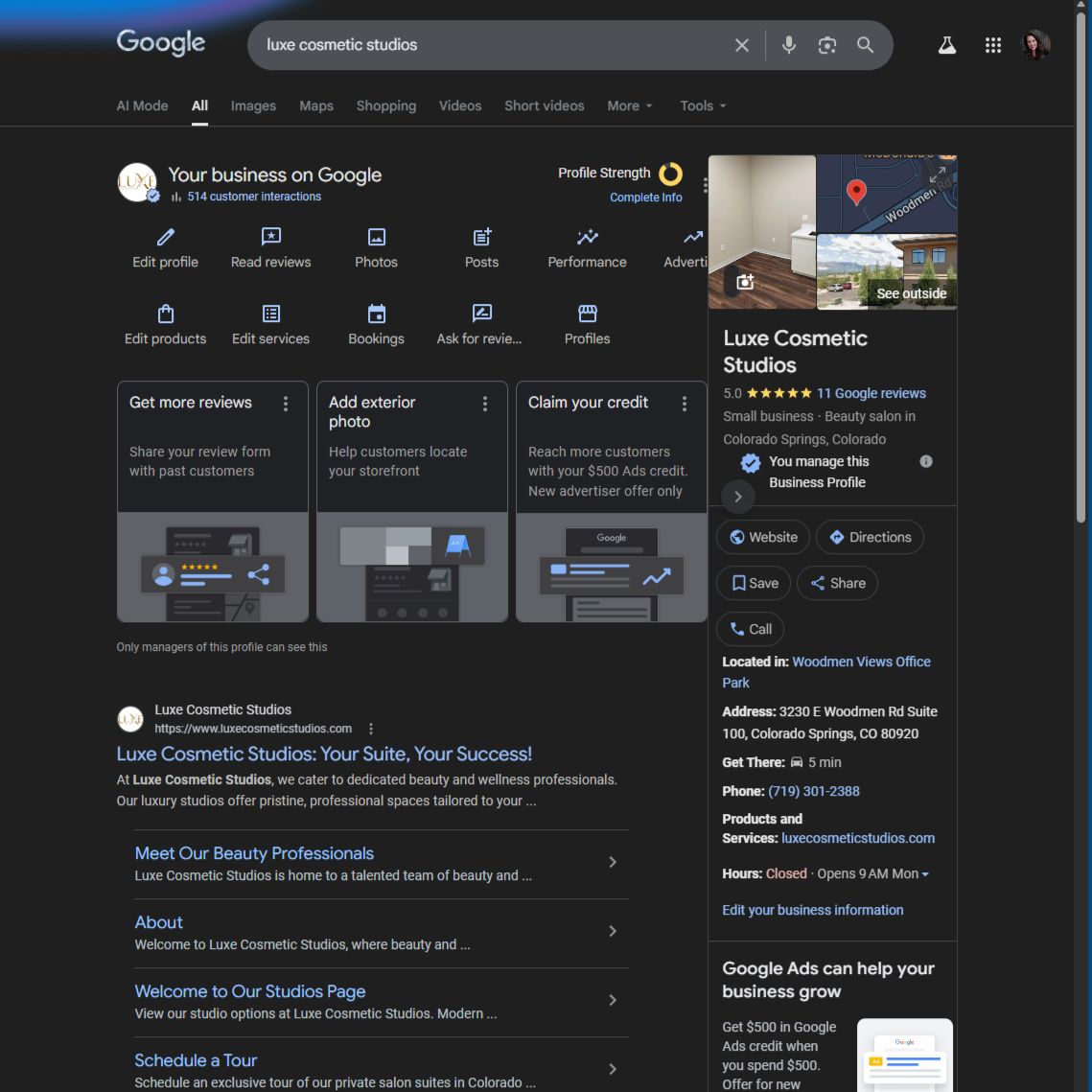
It used to be called Google My Business, so if you hear that name, it’s the same thing. When someone searches for a business like Luxe Cosmetic Studios, this is what shows up on the right-hand side of Google:
Why You Absolutely Need This
1. Boost Local Visibility
Your clients are local. Google prioritizes proximity. A fully optimized profile increases your chances of showing up on Maps.
2. Attract More Clients
Your profile displays:
- Address
- Phone number
- Website
- Reviews
- Services
- Photos
It answers questions before someone even visits your website.
3. Build Trust & Credibility
A complete, updated profile signals:
- Professionalism
- Legitimacy
- Consistency
An incomplete profile signals the opposite.
4. Get Data & Insights
You’ll see:
- How people found you
- What keywords they searched
- How many clicked
- How many requested directions
- How many called
This is powerful business intelligence, use it.
Step 1: Claim & Verify Your Profile
Go to: https://business.google.com/
⚠️ First, make sure you're logged into the correct Gmail. That email will own the profile. You can always add managers later.
You’ll Enter:
- Business name
- Category (choose the closest match)
- Physical location (if clients visit you)
- Contact info (phone, website)
- Service area (if applicable)
Important: Physical Address Rules
- You must verify a real physical location.
- PO Boxes are not allowed.
- Google verifies to prevent fraud.
Verification Methods (These Change Often)
You may be asked to verify via:
- 📹 Video verification (very common now)
- 📱 Phone or email
- 📬 Postcard (less common)
How to Access Your Profile
Two easy ways:
- Google your business name while logged in.
- Go to: google.com/business
You can:
- Edit info
- Add photos
- Post updates
- Read/respond to reviews
- View insights
- Manage booking links
What Makes a Strong Profile?
Here’s your optimization checklist:
✅ Business description (with keywords)
✅ Correct category
✅ Updated contact info
✅ Services + pricing
✅ High-quality photos
✅ Social links (new feature!)
✅ Consistent posting
✅ Active review management
The more complete your profile, the more Google trusts you.
Reviews: Your Ranking Fuel
Let’s talk numbers. 92% of consumers read online reviews before visiting a business. Reviews are not optional. They are conversion tools.
Why Reviews Matter
- Improve local ranking
- Increase trust
- Drive more bookings
- Influence buying decisions
When you search locally, who shows up first? Usually the business with:
⭐ More reviews
⭐ Higher ratings
⭐ Recent activity
That is not a coincidence.
How to Find Your Review Link
- Click “Read Reviews”
- Click “Get More Reviews”
- Copy your unique review link
Add that link to:
- Email templates
- Text messages
- Booking follow-ups
- Your website
- QR codes
Make it easy.
Smart Review Workflow (Steal This)
After each completed appointment:
- Send review request email*.
- Send one friendly follow-up reminder* 3-5 days after if no response.
- Offer an incentive** for leaving a review (not for a 5-star review).
- Respond to every review.
- Share great reviews on:
- Website
- Newsletter
- Highlights
What NOT To Do
❌ Don’t pay for reviews
❌ Don’t ask employees or random friends
❌ Don’t selectively ask only “happy” clients (that’s gatekeeping)
Google sees patterns. Don’t play games.
*
Text Cathy for a copy of email templates.
** Incentives may include coffee gift card, discount on future services, referral bonus, custom gifts, charity donation, entry into a contest, free consultation or session, or access to exclusive content.
If You’re in a Regulated Industry (Medical, Therapy, etc.)
If you can’t directly ask for reviews:
- Provide a visible review link
- Place reminder cards in-office
- Add a “Leave a Review” button on your website
- Respond thoughtfully to all reviews
- Ask professional colleagues (not friends) if your profile is empty
Make it easy without soliciting.
Hidden Features You Should Be Using
1. Posts
Share:
- Promotions
- Events
- Blog links
- Before/afters
- Announcements
Remember, posts expire in about 7 days. Google loves fresh content.
2. Services & Products
Add descriptions + pricing. Make decision-making easier.
3. Q&A
Add your own FAQs and answer them. Clients are already thinking these questions.
4. Booking Button
Allow clients to book directly from your profile. Less friction = more appointments.

Ongoing Action Plan
Biweekly
- Add new photos
- Post updates
- Check for new reviews
Quarterly
- Update services
- Refresh description
- Review insights data
Annually
- Audit everything
- Confirm hours
- Update branding assets
Consistency wins here.
Don’t Skip This: Import to Bing Places
While Google absolutely dominates search, Bing still captures a meaningful share of users, especially on Microsoft devices and default browsers. That means there are potential clients searching there who may never see you if you’re only on Google. The good news? You don’t have to rebuild anything. Simply go to Bing Places and import your existing Google Business Profile. It automatically copies your information over, I wish I knew this before. The entire process takes about two minutes, costs nothing, and instantly expands your visibility across another search engine. Minimal effort, additional exposure, which is an easy strategic win.
The Big Picture
Your Google Business Profile is not just a listing. It is:
- Your credibility
- Your local ranking engine
- Your review hub
- Your conversion tool
- Your reputation center
If your profile is optimized and active, you will outperform competitors who ignore it. And the best part? Most small businesses barely touch this tool, which means you can.
Next Up
In Lesson Three, we’ll build on this and take your local visibility even further. Your move: Go claim, verify, and optimize your profile, and then let’s level up.